
How to share your location with your family
Three steps to bring your family onto one private, live map, and what happens after. No manuals, no complicated settings.
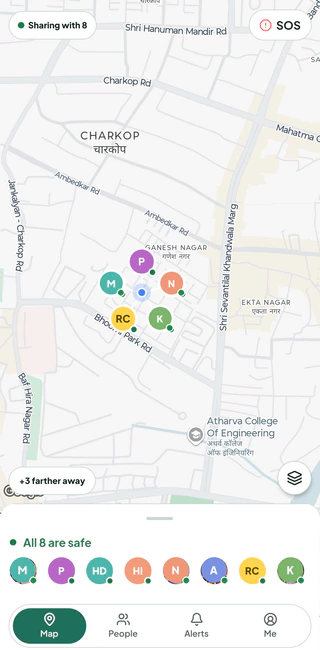
Download Fuzz and sign in.
Install Fuzz free from Google Play or the App Store and sign in with your mobile number. Allow contacts, so Fuzz can find your family (only hashed numbers are checked), and allow location all the time so alerts work while the app is closed.
- Free on Android and iPhone
- Sign in with your mobile number
- Your contacts never leave your phone as names
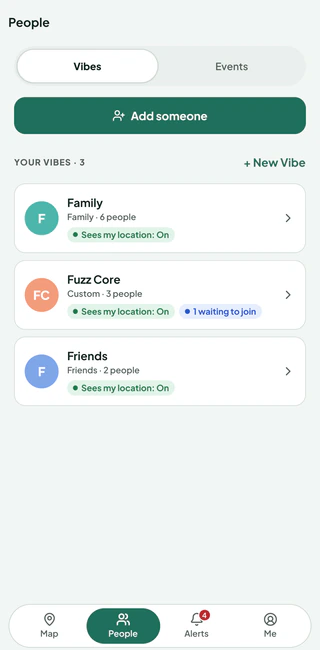
Create your family Vibe.
Create a private Vibe named Family and add your family from your contacts. Once they accept, you see each other live. Then mark Home, College and Office for arrival alerts.
- Home, College and Office safe zones
- Only trusted people
- Know when loved ones arrive or leave
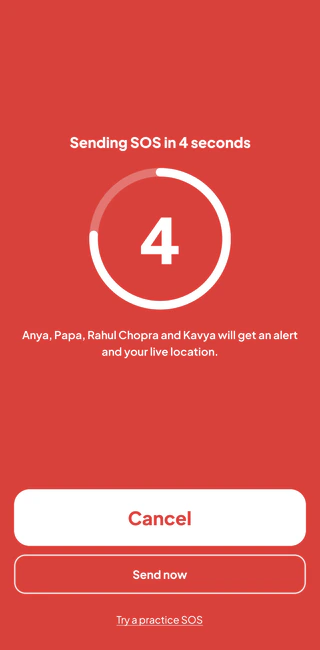
SOS when you need it most.
Choose who gets your SOS. In an emergency, one tap alerts them and sends your location.
- Immediate emergency signal
- Your location sent with the alert
- Help reaches you faster
Invited to a Vibe? Here's what to do.
Written for parents and grandparents. It takes about a minute.
1. Install Fuzz
Get it free from the Play Store or the App Store.
2. Accept the invite
Sign in with your mobile number. The invite shows who is in the Vibe and what they will see. Tap Accept.
3. Allow location
Choose "Allow all the time" so arrive and leave alerts work.
4. You're in
Your family can now see you're safe, and you can see them.
Frequently asked questions
Which phones does Fuzz work on?
Fuzz works on Android 7.0 or later, and on iPhone with iOS 15.1 or later.
Why does Fuzz need "Allow all the time" location?
Arrive and leave alerts and nearby alerts have to work while Fuzz is closed. With "While using the app", your people would only see you when the app is open on your screen.
Do the people I add need the app?
To be in a Vibe, yes: they install Fuzz and accept your invite. To share your location with someone just once, send a live-location link instead; it opens in any browser for 1, 2 or 5 hours.
How do I add someone to my Family Vibe?
Open People and tap Add someone, then pick them from your contacts or type their number. People already on Fuzz get the invite in the app; others get it on WhatsApp. They tap Accept.
Ready to start?
Download Fuzz free on Android and iPhone.
 Scan to download
