
Family location sharing that keeps everyone safe.
See your family on one private, live map. Get a quiet alert when they reach home, college or work, and send one-tap SOS with your location when it matters most.
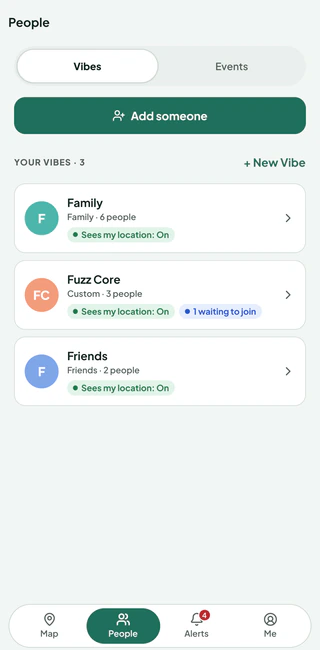
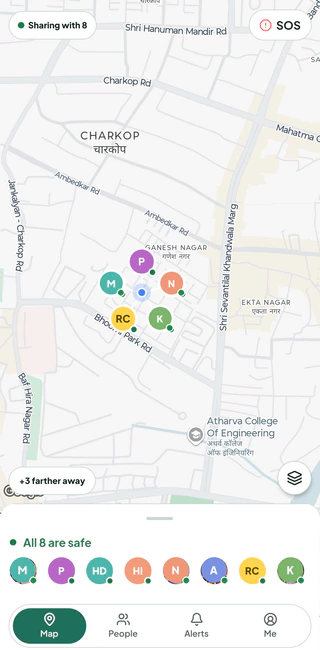
One app to know your family is safe.
Fuzz brings the people you love onto one private map, without constant calls or "reached?" texts.
Family location sharing
Your family on one private, live map, with distance and battery at a glance.
Learn more
Safe zones & arrival alerts
A quiet alert when they reach home, college or work.
Learn more
SOS emergency alerts
One tap alerts your family and SOS contacts with your live location.
Learn more
Live location link
Share where you are with anyone, for a few hours or until you stop. No app needed.
Learn more
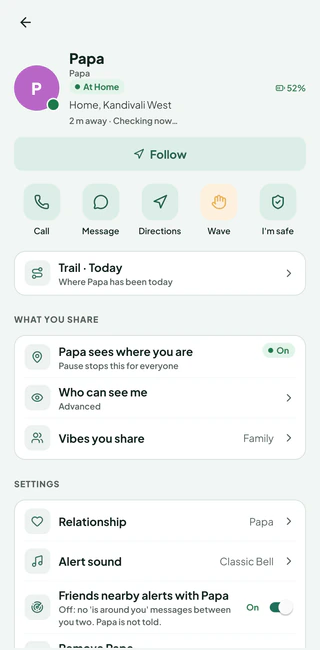
Your family, on one private map.
Create a Vibe, a private group for your family. See who is home, who is on the way and how much battery their phone has left. Only the people you invite can see you.
- Live location on a private family map
- Separate Vibes for family, partner and friends
- Pause sharing whenever you need a break
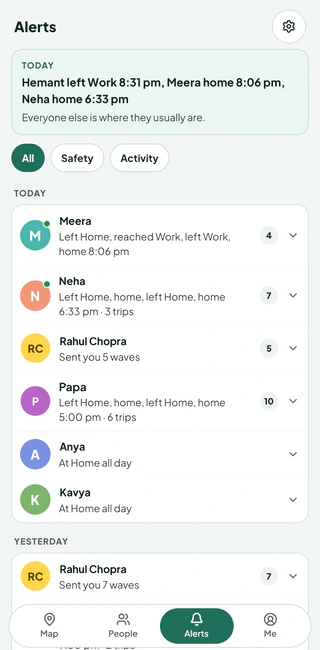
Know they got there safely.
Mark Home, College, Office or any place. When someone arrives or leaves, your family gets one calm alert, so nobody has to call to ask.
- Know your son or daughter reached college
- Know your parents are back home
- Know your partner left the office
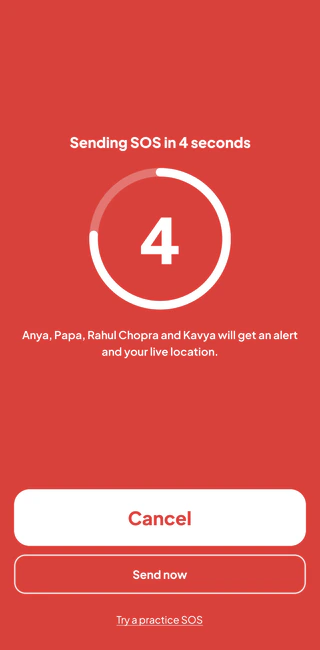
SOS when it matters most.
Press SOS and the people you trust are alerted instantly, with your location, so they know where you are and can reach you faster.
- Instant alerts to your family and SOS contacts
- Your location sent with the alert
- A 5-second countdown, and a practice mode
Share location with your family in three steps.
Download Fuzz
Install Fuzz free on Android or iPhone and sign in with your mobile number.
Create your family Vibe
Add your family from your contacts. Once they accept, you see each other live. Mark Home and College for arrival alerts.
Set up SOS
Choose who gets your SOS, so help is one tap away if you ever need it.
Peace of mind for the people you care about.
College students
Know they reached college, the hostel or a friend's place.
Parents and grandparents
Know they got home safely, without checking in every hour.
Late commutes
SOS and a live link for the ride home.
Everyone, in sync
Who is home, who is on the way, at a glance.
Family safety, without surveillance.
Location sharing should feel like care, not control. Fuzz gives everyone in the family control over who sees them, when they see them and how they can be reached.
How we protect your familySay hello when friends are nearby.
Friends nearby tells you when a friend is close, without showing anyone your exact spot, so a quick one-tap wave can turn into a real meetup.
Explore Friends nearbyWhat people say about Fuzz.
"Our family Vibe is like a safety net, not surveillance."
"I feel safer knowing my family can reach me instantly with SOS."
"I just get an alert when my son reaches his hostel. No more calls in meetings."
Frequently asked questions
How do I share my location with my family?
Install Fuzz, create a Vibe (a private group for your family) and add your family from your contacts. Once they accept the invite, you see each other live on one private map. The step-by-step guide shows each tap.
Is Fuzz free?
Yes. Fuzz is free to download and free to use, on Android and iPhone.
Who can see my location?
Only the people in your Vibes see where you are. If you turn on Friends nearby, friends who also use it see only an area of about 250 m around you, never your exact spot. Pause sharing any time, or use Who can see me to switch off one person or one Vibe.
Will I know when my son or daughter reaches college?
Yes. Add College as a safe zone and link it to your Family Vibe. You get an alert when they arrive and when they leave.
What happens when I press SOS?
A 5-second countdown gives you time to cancel. Then your SOS contacts, starting with your Family Vibe, get a loud alert with your live location. When you are safe, tap I am safe and they are told.
Does it work if my family has both Android and iPhone?
Yes. Fuzz works on Android 7.0 or later and on iPhone with iOS 15.1 or later, in the same family Vibe.
Know your family is safe, wherever they are.
Download Fuzz free and create your family Vibe in a few taps.
 Scan to download
